Thursday, 29 November 2012

Why do IT companies take making money too far?


It seems to be a worrying trend in the IT industry. More and more often we at TLP Technology have new customers come to us with the following complaints:

- My IT company don't do what I want they do what they want
- I can't get hold of my IT company/I am not getting the service I was promised
- My IT company made me do something and it doesn't work
- I have left my IT company but I don't have any of the details to get access to my servers

Now I will be the first to admit that I am not the most technically capable IT Engineer. Neither will I claim I never make a mistake. However, I have always done the best possible job that I could, and gave people advice that I thought was the best option for them. On most occasions, this involves not offering people the option that will generate me/the company I work for the most money.


But there seem to be so many people out there who just don't have the mentality of providing customer service. It seems there are many companies out there looking to make a quick quid, and if that means the customer doesn't stay, then no matter.

I know what people will be saying. Why are you complaining, it is giving you work. I know that. I know. But that doesn't make it OK. It doesn't mean that people should have to suffer it.

So I want every single organisation out there - you don't have to put up with poor service, you don't have to put up with following advice without explanation, and you shouldn't expect the company providing your IT support to ignore their expected standards. So go out there, and find one of the hundreds of companies/individuals that do it right.

Friday, 23 November 2012

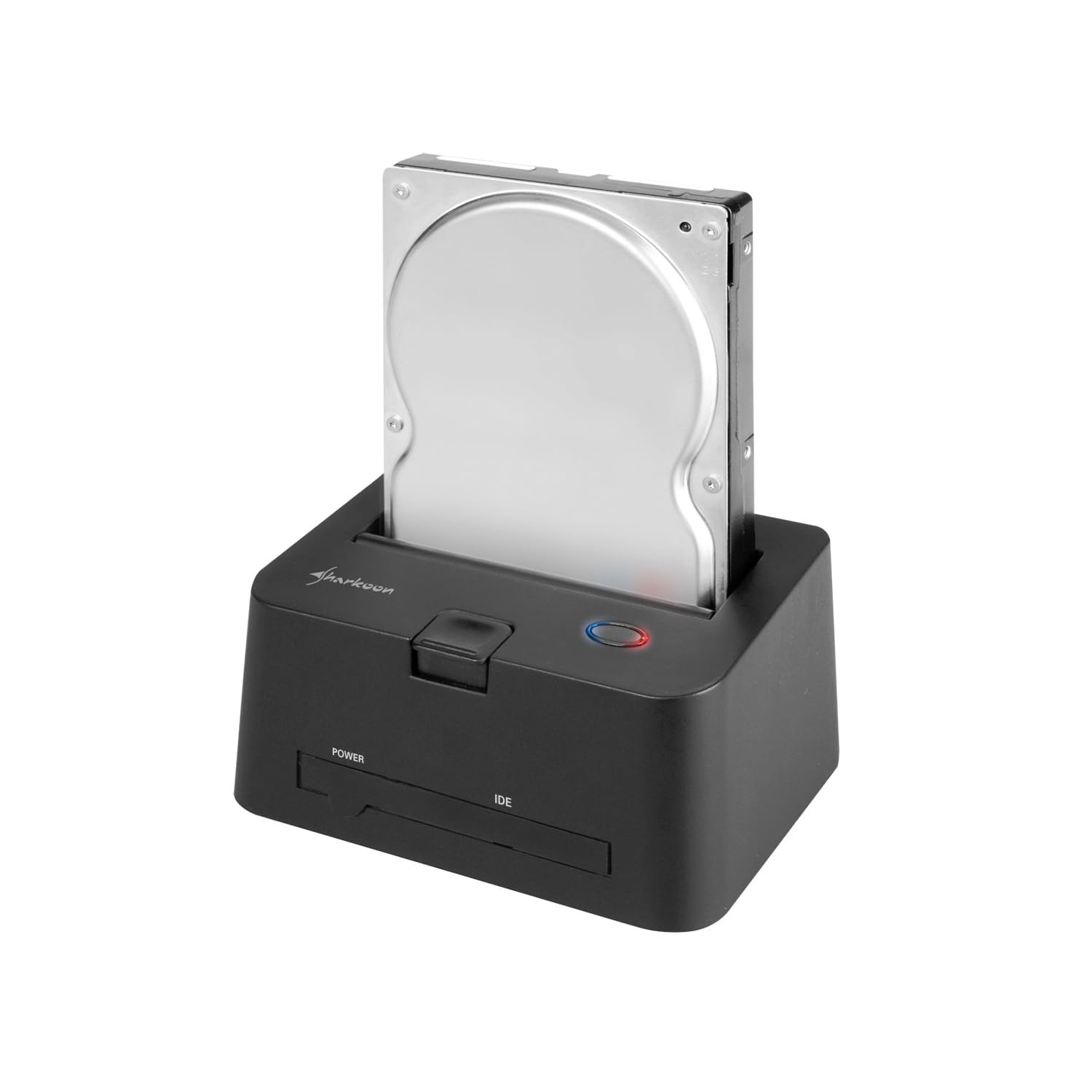
Review: Sharkoon QuickPort Combo for Sata and IDE HDD

Here in the office we are dealing with hard drives nearly ever day. Whether it is getting data off a drive removed from a laptop, checking to see if a drive is working properly to many other reasons. We have historically used an old 3.5" caddy and fiddle with it until it works... Not any more!

We got the Sharkoon QuickPort for £33.37 from Amazon so that whenever we need to carry work out on a hard drive we can just drop the disk in, do our work and it is as simple as that!

The dock supports 2.5" and 3.5" SATA disks and holds both form factors securely in place with a reassuringly solid click. IDE drives are attached using the plug adapters on the front (using the cables that come provided in the box). All in all it covers all bases fantastically well, with no drivers requiring installation, a literal Plug & Play device - although this is not the case when using IDE.

Ludicrously simple to set up, and ticking all the boxes in use, a must buy for anyone who manages multiple disks, and a great solution if you want to use HDs for your backup!

Wednesday, 21 November 2012

Tab key stopped working? Try this!


OK, another How To, and another problem that has had me absolutely stumped! A user rang up and reported that his Tab key had stopped working, and his Windows key had stopped working for shortcuts... Now I have heard of this happening when someone has a file on a key by accident, or accidentally switched Sticky Keys on, but having checked for both of these I ran out of ideas.


Then I pulled together various suggestions, which I think would be a "Go-To" list to fix this issue. Try each of these points and then see if the keys work as normal again:

1. Press the "Windows" Key twice - this will turn off sticky-keys if it has been accidentally enabled.

2. Press Alt twice.

3. Press Ctrl twice.

4. Change the keyboard language in Control Panel from your current (Normally English - UK for us Brits) and then back to what it was before.

5. Reboot your machine.

If none of these work, try going to Device Manager (Under Administrative Tools) and then under the Keyboard tree, uninstall the Keyboard driver. This will stop your keyboard from working. Then reboot your machine again and see if this resolves the issue.

I can offer no explanation of what this issue is, what the cause is, or why any of these fixes (other than the last) fix it. But hopefully this will save you a bit of time if you ever come across this problem!

Tuesday, 20 November 2012

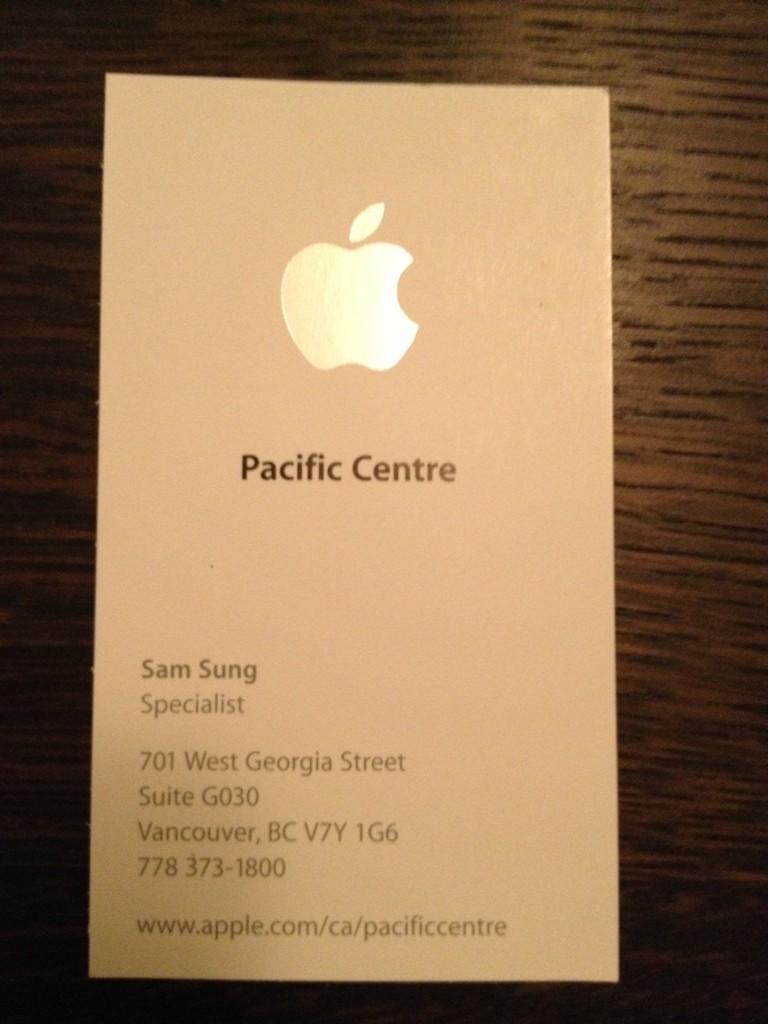
Most ironic employee name goes to...

Sam Sung, a specialist apparently working for Apple. I know, you couldn't write it could you!


This story originates from The Loop (original story here) but was just too good not to share!

Do you have any funny employee names? Let us know in the comments section!

Monday, 19 November 2012

Beware Mobile Dongle Outlook Issues!!!!

Following a sadly familiar merry-go-round affair between a customer and BT with regards to their business broadband, I advised them to purchase a cheap Mobile Broadband Dongle as a temporary measure so that one machine could connect to the company emails. They did this, and were very impressed when their emails (all 150 of them) began downloading.


With a well practiced "I fixed it no problem" smug walk off into the distance I returned to my office, and then received a call from the customer informing me that they could still receive emails fine, but could not send.

For some reason, the provider of this mobile dongle deems opening Port 25 (the default for sending mail from Outlook and most other mail clients) far too dangerous to allow. Thankfully, the first thing I tried was changing the port over to 587 (I will cover this in a later post) worked and the user got a 5 minute fix - and I got to do my smug walk again! However, if you use a Mobile Broadband Dongle for working while on the road, beware this little nasty, and make sure mail exits your Outbox!

Review: Brother HL-3070CW Laserjet Printer

This small affordable Brother Laserjet printer is exactly the sort of thing Small Businesses should be looking at moving to if they are currently using Inkjet/Officejet style printers. Colour, Wireless and a Laserjet, and the model we supplied came in at under £180 including V.A.T. (Although the printer is listed as £216 inc. V.A.T. on the Brother website).

The printer looks and feels sturdy and not at all as "Budget" as the price suggests, and although not really small enough to share a desk with a computer/monitor, it is still smaller than the traditional HP Laserjets which are so popular in office environments.

Set up was relatively easy, although it is slightly frustrating that you have to use the supplied CD to set the machine up on a wireless network - although it does support Secure Easy Setup and other 1-touch wireless setup technologies such as AOSS. Once on the network, the drivers were simple to install on the computer as well, and a real plus is the "Driver Only" option, which will only install the required printer drivers onto the computer, and no unwanted Third Party applications that will never get used.

Print quality was good, producing bright colours although blacks aren't quite as deep as you would expect from a higher end Laserjet. Finally, one of the most impressive things about this machine from a budget perspective is the Pages Per Minute statistics, traditionally very poor when you dip below £250 for a Colour Laserjet. Not here, with equal speed for colour and black & white of up to 16ppm.

All in all, a very impressive offering from Brother at an equally impressive price, my recommended option for any small business looking for a new colour printer without big bucks to spend.


Friday, 16 November 2012

How to: Fix Outlook hyperlink error!

I recently came across an incredibly frustrating error within Outlook (in this case 2007, but I know it can affect other versions as well) when a user selected a Mailto (Email) hyperlink within an email. They were presented with the following error:


This operation has been canceled due to restrictions in effect on this computer. Please contact your system administrator.
I went though various attempts at sorting this out. The most popular fix appeared to be resetting the Internet Explorer settings. No joy. Next people blamed default program settings. No joy. Now I was truly stumped. The user said to me that this had only happened since they installed Google Chrome, but they had since uninstalled it. But I could not put anything together!

Now eventually I found a link to a Microsoft FixIt (find it here) which resolves a problem in the Registry. Supposedly caused by the installation/uninstallation of Chrome. Why this isn't affected by default programs or Internet Explorer settings, I cannot work out, but it certainly seems like a good fix for what appears a rather random and "Needle in a haystack" problem.


Thursday, 15 November 2012

How to: Add a calendar to Outlook

One of the more simple jobs I have had to do this week, and the sound of surprise from the user when they saw how easy it was, was adding a calendar to Outlook. I think some people possibly think it will take a lot of configuration, perhaps, and are worried about doing it. Not true! It is incredibly easy!

Open Outlook and go to your calendar. You should see a list of calendars on the left with check boxes. There may only be one, your normal calendar. Right-click on the calendar and the option "New Calendar" shows in the list. Click on it, and it will open a new calendar next to your original. It is as simple as that!

Thursday, 1 November 2012

Apple playing catch up... and losing its cool...

There has been a funny trend beginning in the second half of 2012. A new experience for Apple. Some genuine competition. For the first time since the original release of the iPhone in 2007 the tech giant is playing catch up. The Samsung Galaxy S3 is the first real contender to the iPhone - certainly if you take purely number of sales into account - and it is not the only area where Apple appear to be losing out.


The success of smaller tablets entering the market - Amazon Fire, Nexus 7 - has shown a gap in Apple's product line, which they have now had to start from behind, go back on their word (or at least Steve Jobs') and release a smaller tablet of their own. A smaller tablet which I am still not convinced is going to be a success.

Could it be that in these times of economic crisis, Apple are finally suffering? With the "ordinary man" struggling to find the money to get by, is it any surprise that the elitist design and pricing of Apple products is beginning to lose favour? The more budget tablets have shown huge growth in 2012, and with Google's announcement this week of a Nexus 10" tablet - again at a cheaper price than the iPad - will this take still more sales away from the marquee, most expensive, most exclusive tablet on the market?


In the midst of this competition, we have seen several strange decisions coming out of the Cupertino based outfit. Apple was always the most desirable because you had to wait. You only got things when they wanted you to. But in the last couple of years we have seen the disappointing release of the rushed and not very much improved iPhone 4S. The release of the "New iPad". The iPhone 5 which was a bit better, but still left people slightly disappointed. Then only 9 months after the last release, another new iPad, as well as a late arrival to the party the iPad mini (which Apple have previously said wasn't necessary).


With all these releases, products playing catch up, and so many announcements leaving consumers cold, had Apple lost its touch? Is the influence that was still left from Jobs' reign now gone? Are we seeing the real beginning of the Tim Cook era? Only time will tell, but many see this as the start of a slippery slope.

But when people begin to doubt - that is when Apple normally pull something out of the bag isn't it?

Images linked from Google and Apple sites directly.

Review - Toshiba Satellite Pro - C850-173


I have been working with the Toshiba Satellite Pro over the last few days, and it again surprises me how flimsy and unprofessional Toshiba's business orientated laptop feels. There is a huge amount of flex in the keyboard, and the keys themselves feel flimsy and cheap. The trackpad, on the other hand is solid with sturdy buttons which give a solid click when you press, but not so much that it will become annoying during extended use.

The model I am using has a Intel Core i3 processor and 4GB memory, and performance is OK, although the rigmarole of installing the pile of OEM rubbish that comes with the laptop did seem to take an exhorbittant amount of time. Once installed, however, startup times aren't bad and when you log in your desktop is ready to use almost immediately (with pre-installed Windows 7).

The textured cover looks and feels very nice, almost complete opposite of the cheap feel to the keyboard, and the screen feels secure and solid when opening and closing the lid. The build quality also seems good with the chassis, which has barely any bend to it, and everything sealed and feels solid.

All in all a well built laptop at a budget price, although I can imagine the keyboard becoming tiresome with prolonged use, and with my heavy fingers and inaccurate typing, I could well imagine keys just flying straight off the keyboard!

**/*****
2/5

Images used from Toshiba website. For full details of model specified Click Here

SBS POP3 Connector - Message Exceeds Maximum Message Size

We recently set up a new server for one of our customers using SBS 2011. Simple set up, everything you need in the console and all pretty self explanatory. Superb! However, a week later, we had a strange call from the customer explaining that some of their mail wasn't being delivered. Odd. Upon further inspection, and finding the awfully placed Exchange logs (Some are in Microsoft > Exchange under Applications and Services, however the actual useful information was coming up in the Windows Small Business Server 2011 section... Microsoft making it easy for us as ever...).

I did, however, find this message:

Event ID 210
One or more of the messages (message number) were left in the ‘[accountname]‘ account on the POP3 Server ‘[servername]‘ because they are larger than the maximum acceptable message size (the largest message is [messagesize] bytes). You can either connect to the POP3 account and retrieve or delete the messages manually, or increase the maximum acceptable message size in Exchange Server.


The problem was that some messages, ranging in size from just over 10mb to just under 15mb were too big to be downloaded. So I did some digging, tried changing the Transport settings, however, the real solution is actually very simple, if not immediately obvious.

Exchange sets a default maximum message size of 10mb for downloading, but it is not just the connecter that is being used you need to change, it is several.

“Windows SBS Fax Sharepoint Receive [servername]”
“Windows SBS Internet Receive [servername]”
“Default [servername]” 

Now, you need to change the maximum message size for all three of these connectors using the Exchange Management Shell and the following command:

set-receiveconnector “Windows SBS Fax Sharepoint Receive [servername]” -maxmessagesize 20mb

Once you have done this for all three of those Receive Connectors, you will find that your mail will download as long as the new limit is high enough. And don't make the same arrogant mistake I did of saying "Of course I don't need to do all three, I'll just change my actual mail connectors and ignore the Fax connector". You do.